1. Introduce
SystemCis a C++ class library, that provides a mechanism for managing complex systems involving large numbers of components.SystemCis capable of modeling hardware and software together at multiple level of abstraction (Algorithm / Functional level, Transaction-Level Modeling, Register Transfer Level)
Modeling is the process of creating a simplified version of a real system. Simulation is the process of executing the model over time to see how it behaves.
systemc/
├── src/
│   ├── sysc/
│   │   ├── kernel/         # Simulation kernel (sc_module, sc_event, processes, sc_time…)
│   │   ├── communication/  # Ports, signals, FIFOs, mutexes, exports
│   │   ├── datatypes/      # Bit/integer/fixed-point data types
│   │   ├── tracing/        # VCD and WIF trace file writers
│   │   └── utils/          # Reporting, sc_vector, sc_string_view
│   ├── tlm_core/
│   │   ├── tlm_1/          # TLM-1 legacy interfaces and channels
│   │   └── tlm_2/          # TLM-2.0 (generic payload, sockets, phases, DMI)
│   ├── tlm_utils/          # TLM utilities (simple_target_socket, simple_initiator_socket, peq…)
│   ├── systemc.h           # Top-level SystemC include
│   └── tlm.h               # Top-level TLM include
├── examples/
│   ├── sysc/               # SystemC examples (pipe, RISC CPU, FFT, simple_bus…)
│   └── tlm/                # TLM-2.0 examples (LT, AT 1/2/4-phase, DMI, mixed endian…)
├── tests/
│   ├── systemc/            # Regression tests for SystemC core
│   └── tlm/                # Regression tests for TLM
├── docs/
│   ├── sysc/               # SystemC documentation
│   └── tlm/                # TLM documentation
├── cmake/                  # CMake helper scripts and config templates
├── docker/                 # Docker build environments (Ubuntu, AlmaLinux)
├── CMakeLists.txt
├── INSTALL.md
└── README.md
2. Environment Setup
$ cat Dockerfile
FROM ubuntu:24.04

# Avoid interactive prompts
ENV DEBIAN_FRONTEND=noninteractive

# Install dependencies
RUN apt-get update && apt-get install -y \
    build-essential \
    cmake \
    wget \
    git \
    libssl-dev \
    && rm -rf /var/lib/apt/lists/*

# Set working directory
WORKDIR /opt

# Download SystemC (you can change version if needed)
RUN wget https://www.accellera.org/images/downloads/standards/systemc/systemc-2.3.3.tar.gz \
    && tar -xzf systemc-2.3.3.tar.gz \
    && cd systemc-2.3.3 \
    && mkdir build && cd build \
    && ../configure \
    && make -j$(nproc) \
    && make install

# Set environment variables
ENV SYSTEMC_HOME=/usr/local/systemc-2.3.3
ENV LD_LIBRARY_PATH=$SYSTEMC_HOME/lib-linux64:$LD_LIBRARY_PATH

# Default shell
WORKDIR /workspace
CMD ["/bin/bash"]
3. Hello World
- Header files:
<systemc.h>or<systemc> - Entry point:
int sc_main(int argc, char* argv[])(systemC library has themain()function already defined) - SystemC module: is a class that inherits the
sc_modulebase class.
#include <systemc.h>  // systemc library header

// Define a SystemC module
struct MyModule : sc_module{
        void helloWorld(){
                std::cout << "Hello SystemC World!\n\n";
        }

        // System C module constructor
        SC_CTOR(MyModule){
                // register a member function to the kernel
                SC_METHOD(helloWorld);
        }
};

int sc_main(int argc, char* argv[]){
        // instantiate a SystemC module
        MyModule hello_world_module("hw_module");

        // let systemC simulation kernel
        sc_start();

        return 0;
}
4. SystemC Scheduler
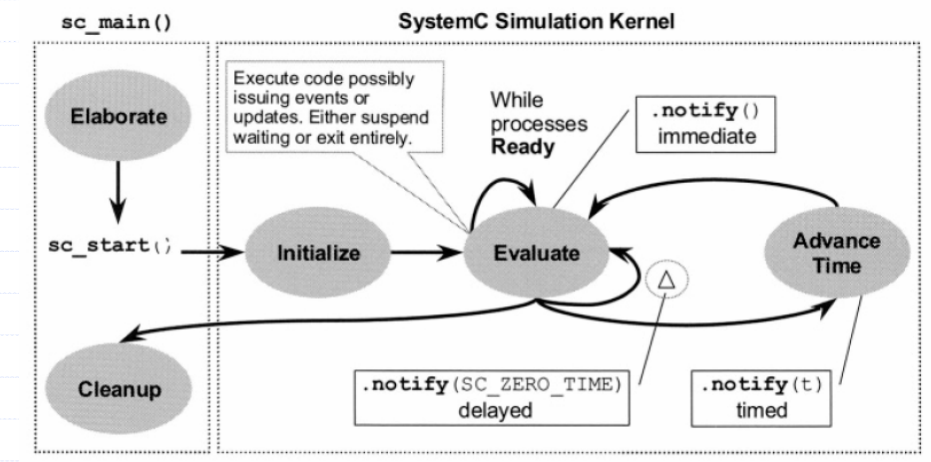
- The description of the scheduling algorithm uses the following four sets:
The set of runnable processes: Processes ready to execute right now, SC_METHOD / SC_THREAD that are triggered, Kernel picks one, runs it until it yieldsThe set of update requests: Deferred channel updates, e.g.sc_signal.write(), stored and executed later in update phaseThe set of delta notifications and time-outs: run at same simulation time, but next delta cycleThe set of timed notifications and time-outs: future events (time advances)
- Step 1: Elaboration
- Creating instances of clocks, design modules, and channels
- Establishes hierarchy and initializes the data structures
- Register processes and perform the connections between modules
- Step 2: Initialization
- Each process is executed once (SC_METHOD) or until a synchronization point (i.e., a wait) is reached (for SC_THREAD)
- Step 3: Evaluation (Delta cycle=c0, time = t0)
- Select a process being ready to run and resume for its execution
- If a process P has been executed in the current phase, it will be triggered again if a controlling event is notified immediately
- Step 4: Update (Delta cycle=c0, time = t0)
- Execute any pending calls to update() resulting from the calls to request_update() in the evaluation phase
- The update of channels could generate notification of events
- Step 5: Delta-delay processing (Delta cycle=c0+1, time = t0)
- If there are pending delta-delay notifications, determine which processes are ready to run and go to the evaluation phase (Step 2)
- Simulation time is not advanced
- Step 6: Simulation time advance (Delta cycle=c0, time = t1)
- Advance the simulation time to the earliest pending timed notification
- Determine which processes are ready to run due to the events that have pending notifications at the current time
- If there are no more timed notification, the simulation is finished
Initialization
- Happens after
sc_start(), perform the following:- Run the
update phasebut without continuing to thedelta notification phase. - Each
processis executed once, (to turn off initialization for a particular process,dont_initialize()function can be called after the process declaration inside a module constructor.) - Run the delta notification phase
- Run the
Evaluation Phase
- Using the
runnable processes setwhile (runnable not empty): pick 1 process run it until: - returns (SC_METHOD) - wait() / suspend (SC_THREAD) - During execution:
Immediate notify: add sensitive processes torunnable processes set(same phase)request_update(): add toupdate requests setnotify(SC_ZERO_TIME) / wait(SC_ZERO_TIME): add todelta notifications setnotify(t > 0) / wait(t > 0): add totimed notifications set
=> Move to Update Phase when runnable processes set becomes empty
Update Phase
- Using the
update requests setfor each channel with pending request_update: call update() // at most once per channel - Applies deferred updates (e.g.,
sc_signal write)
=> Always move to Delta Notification Phase
Delta Notification Phase
-
Using the
delta notifications and time-outs setfor each pending delta notification / timeout: find processes sensitive to the event add them to `runnable processes set` -
Clear all processed delta notifications
=> If runnable processes set is NOT empty: go back to Evaluation Phase
=> Else: go to Timed Notification Phase
Timed Notification Phase
- Using the
timed notifications and time-outs setif set not empty: t = earliest scheduled time advance simulation time to t for all notifications/timeouts at time t: find sensitive processes add them to `runnable processes set` remove all processed items at time t else: end simulation
=> If runnable processes set is NOT empty => go to Evaluation Phase
5. Core Language
5.1. Class headers
<systemc>vssystemc.h
5.2. Module <sc_module>
- Modules are the principle structural building blocks of SystemC.
- It encapsulates
structure (sub-modules),communication (ports/signals), andbehavior (processes). - It inherits the
sc_moduleclass. - It used to represent a component in read systems.
- It encapsulates
- e.g.
SC_MODULE(Counter) {
    sc_in<bool>       clk;
    sc_in<bool>       reset;
    sc_out<sc_uint<8>> count;

    sc_uint<8> cnt;

    void do_count() {
        if (reset.read()) cnt = 0;
        else              cnt++;
        count.write(cnt);
    }

    SC_CTOR(Counter) {
        SC_METHOD(do_count);
        sensitive << clk.pos();
    }
};
- Use
SC_CTORorSC_HAS_PROCESSfor create the constructor sc_module_nameclass for name param, access vianame()
5.3. Process
- A process is a member function of a module, that registered with the simulation kernel.
- Three types of process:
SC_METHOD,SC_THREAD,SC_CTHREADType Macro Description SC_METHODSC_METHOD(func)Re-executes on every trigger; no wait()allowed.SC_THREADSC_THREAD(func)Runs once; can call wait()to suspend and resume. Keeps state.SC_CTHREADSC_CTHREAD(func, clk.pos())Like SC_THREADbut clocked; useswait()to advance one clock.
5.3.1. Method Process <SC_METHOD>
Initially triggeredwhen the kernel calls the function associated with the process- Does not allow
wait() - static sensitivity to defines when the process is triggered again, by using
sensitive << event&event.notify()(notificationstake effect in the next delta cycle) - dynamic sensitivity by calling
next_trigger()to be triggered again. - run in the same execution context as the simulation kernel
5.3.2. Thread Processes <SC_THREAD>
- function is invoked once by the kernel and typically contains an infinite loop to prevent it from terminating
wait()to suspend execution- resumes execution from the point immediately after
wait() - static sensitivity by using
sensitive << event&wait() - dynamic sensitivity is created by calling
wait(event) - requires its own execution stack (thread) (higher overhead than SC_METHOD)
5.3.3. Clock Thread Processes <SC_CTHREAD>
- similar to
SC_THREAD, but specialized for clocked (cycle-based) modeling - must be a static process (cannot be spawned)
- must be statically sensitive to exactly
one clock edge - executes once per clock cycle after each, and allows only
wait()orwait(int)to advance clock - supports synchronous and asynchronous reset signals
5.3.4. Dynamic Processes <sc_spawn>
- sc_spawn is a flexible way to dynamically create and control processes, with arguments + return values.
template <typename T>
sc_process_handle sc_spawn(
    T object ,
    const char* name_p = 0 ,
    const sc_spawn_options* opt_p = 0 );

template <typename T>
sc_process_handle sc_spawn(
    typename T::result_type* r_p ,
    T object ,
    const char* name_p = 0 ,
    const sc_spawn_options* opt_p = 0 );

#define sc_bind boost::bind
#define sc_ref(r) boost::ref(r)
#define sc_cref(r) boost::cref(r)
-
sc_spawnfunction to create a static or dynamic spawned process instance during:- Elaboration phase: child of a module (or top-level in
sc_main) - Simulation phase: child of the calling process
- Elaboration phase: child of a module (or top-level in
-
sc_bind,sc_ref, andsc_crefto bind arguments ((by value, reference, or const reference)) to spawned functions. -
The spawned process can be configured using
sc_spawn_options(e.g., method/thread type, sensitivity,dont_initialize). -
e.g.
#define SC_INCLUDE_DYNAMIC_PROCESSES
#include <systemc>

using namespace sc_core;

int function() {
  LOG_MAIN("function call");
  return 1;
}

int function_args(int a, int& b, const int& c) {
  LOG_MAIN("function call");
  LOG_MAIN("args: a=" + std::to_string(a) + " b=" + std::to_string(b) +
           " c=" + std::to_string(c));
  return a + b + c;
}

struct Functor {
  typedef int result_type;
  result_type operator()() { return function(); };
};

SC_MODULE(Test) {
  sc_signal<int> sig;
  int ret;

  SC_CTOR(Test) {
    SC_THREAD(thread);
    // sc_spawn(&::function);
  }

  void function() {
    LOG("function call");
  }

  void thread() {
    LOG("begin");

    //  spawn a function without arguments and discard any return value.
    sc_spawn(&::function);
    wait(1, SC_SEC);

    // spawn a similar process and create a process handle.
    sc_process_handle handle = sc_spawn(&::function);
    wait(1, SC_SEC);

    // spawn a function object and catch the return value.
    Functor fr;
    sc_spawn(&ret, fr);
    LOG("Value: " + std::to_string(ret));
    wait(1, SC_SEC);

    // spawn a method process named "f1", sensitive to sig, not initialized.
    sc_spawn_options opt;
    opt.spawn_method();
    opt.set_sensitivity(&sig);
    opt.dont_initialize();
    sc_spawn(::function, "f1", &opt);
    wait(1, SC_SEC);

    //  spawn a similar process named "f2" and catch the return value.
    sc_spawn(&ret, fr, "f2", &opt);
    LOG("Value: " + std::to_string(ret));
    wait(1, SC_SEC);

    // spawn a member function using Boost bind
    sc_spawn(sc_bind(&Test::function, this));

    // spawn a member function using Boost bind, pass arguments and catch the return value.
    int A = 0;
    int B = 2;
    int C = 3;
    sc_spawn(&ret, sc_bind(&::function_args, A, sc_ref(B), sc_cref(C)));
    LOG("Value: " + std::to_string(ret));
    wait(1, SC_SEC);
    LOG("end");
  }
};

int sc_main(int, char*[]) {
  Test test("m");

  sc_start();
  return 0;
}

// @ 0 s delta=0 [m] [thread] begin
// @ 0 s delta=0 [main] [function] function call
// @ 1 s delta=1 [main] [function] function call
// @ 2 s delta=2 [m] [thread] Value: 1
// @ 2 s delta=2 [main] [function] function call
// @ 4 s delta=4 [m] [thread] Value: 1
// @ 5 s delta=5 [m] [thread] Value: 1
// @ 5 s delta=5 [m] [function] function call
// @ 5 s delta=5 [main] [function_args] function call
// @ 5 s delta=5 [main] [function_args] args: a=0 b=2 c=3
// @ 6 s delta=6 [m] [thread] end
5.4. Sensitivity
- The sensitivity of a process instance is the set of
events and time-outsthat can potentially causethe process to be resumed or triggered. - A process instance is sensitive to an event if the event has been added to the
static/dynamic sensitivityof the process instance. - The time-out occurs when a given interval time has elapsed.
- There are two types of sensitivities:
Static: classsc_moduleshould have a data member typedsc_sensitivenamed sensitive, used to create static sensitivity. (sensitive << event << event;&wait())Dynamic: under control of the process itself. (wait(event | event)&next_trigger())
static sensitive is created at the time the process instance is created, so i means applies to the most recently declared process
5.5. Event <sc_event>
- An event is an object, represented by class
sc_event,that determines whether and when a process execution should be triggered or resumed. - Event Occurrence: Event object keeps a list of processes that are sensitive to it. The owner of the event report the change to the event -> event object inform the scheduler of which processes to trigger.
- Event Notification: Events can be notifies in three ways -
immediate,delta-cycle delayed,and timed(An earlier notification will always override one scheduled to occur later) - Canceling Event Notification: A pending delayed event notification may be canceled using
cancel().
sc_event my_event;

// Notify types:
my_event.notify();                          // Immediate notification (current delta)
my_event.notify(SC_ZERO_TIME);             // Delta-cycle notification
my_event.notify(10, SC_NS);               // Timed notification after 10 ns

// Cancel a pending notification:
my_event.cancel();

// Wait for an event inside SC_THREAD:
wait(my_event);

// Wait for multiple events:
wait(event_a | event_b);
wait(event_a & event_b);
5.6. Time
- SystemC uses an integer-valued absolute time model. Time is represented by an
unsigned integer of at least 64-bits. - There is two type of
time measurements:wall-clock time: is the timefrom the startof executionto completion.simulated time: is the time being modeled by the simulation, which maybe less/greater than the simulation’s wall-clock time.
5.6.1. <sc_time>
- sc_time is used to represent simulation time and time intervals, including delays and time-outs.
SC_SEC, SC_MS, _US, _NS, _PS, _FCsc_time(1, SC_FS): to create asc_time(sc_time( double v, sc_time_unit tu ))sc_time_stamp()to get the current simulated time.SC_ZERO_TIME: a time value of zero, to create a delta notification or delta time-out
5.6.2. Time Resolution
- Default is 1ps
sc_set_time_resolution()to set time resolution once
5.6.3. Default Time Unit
- Default is 1ns
sc_set_default_time_unit()to set time unit once
5.7. Data Types
- 4-valued Logic type
- 4-valued Logic vectors
- Bits and Bit Vectors
- Arbitrary Precision Intergers
- Fixed-point types
- C++ types
5.7.1. Valued Logic Type
- SystemC introduces the
sc_logictype to represent digital signals with four possible values:- ‘0’ → Logic 0
- ‘1’ → Logic 1
- ‘Z’ → High impedance (tri-state)
- ‘X’ → Unknown / undefined
// for modeling real hardware behavior where signals are not always strictly 0 or 1.
sc_logic a = SC_LOGIC_0;
sc_logic b = SC_LOGIC_1;
sc_logic c = SC_LOGIC_Z;
sc_logic d = SC_LOGIC_X;
5.7.2. 4-Valued Logic Vectors
- To represent multiple logic bits, SystemC provides
sc_lv<N>(logic vector). Each bit can be ‘0’, ‘1’, ‘Z’, or ‘X’
sc_lv<4> data = "10XZ"; // Used for buses and signals where unknown or high-impedance states must be modeled.
5.7.3. Bits and Bit Vectors
- For 2-valued logic (only 0 and 1), SystemC provides:
sc_bit→ single bitsc_bv<N>→ bit vector
// These are faster than 4-valued types because they only support binary values.
sc_bit b = 1;
sc_bv<8> byte = "10101010";
5.7.4. Arbitrary Precision Integers
- SystemC supports integers with customizable bit widths:
sc_int<N>→ signed integersc_uint<N>→ unsigned integer
// Useful for modeling registers and datapaths with exact bit sizes.
sc_int<8> a = -10;
sc_uint<8> b = 255;
5.7.5. Fixed-Point Types
- For precise fractional arithmetic, SystemC provides fixed-point types:
sc_fixed<W, I>→ signed fixed-pointsc_ufixed<W, I>→ unsigned fixed-pointW= total number of bits,I= number of integer bits
// used in DSP and embedded systems.
sc_fixed<8,4> a = 3.25;
sc_ufixed<8,4> b = 2.5;
5.7.6. C++ Types
- They are not bit-accurate
5.8. Communication - Interfaces, Ports & Channels
- Classical hardware modeling uses hardware signals as the medium for communication and synchronization between processes
- SystemC modeling uses interfaces, ports, and channels to provide for the flexibility and high level of abstraction needed
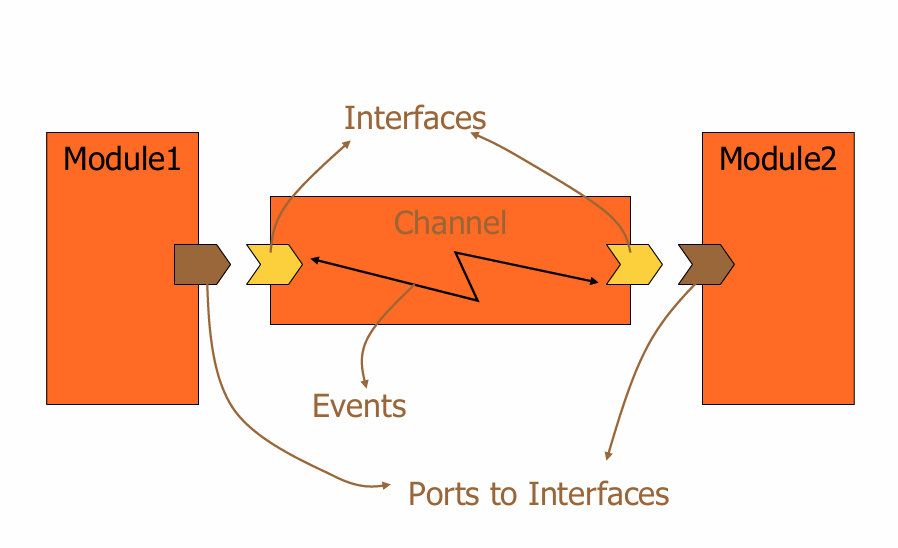
- The basic modeling elements consist of interfaces, ports and channels.
- An interface defines the set of access functions (methods) for a channel.
- A port is a proxy object through which access to a channel is facilitated.
5.8.1 Interfaces
-
An Interface (Interface Method Call) defines a set of (member) functions, derived from
sc_interface, which contains a set of pure virtual functions that shall be defined in one more channels derived from that interface. -
A
channelimplements aninterface -
A
modulecallsinterface methodsvia aport- e.g.
// Declaration of Interfaces
#pragma once
#include <systemc>
using namespace sc_core;

class write_if : public sc_interface {
 public:
  virtual void write(char) = 0;
  virtual void reset() = 0;
};

class read_if : public sc_interface {
 public:
  virtual void read(char&) = 0;
  virtual int num_available() const = 0;
};
- e.g.
-
There are a number of interfaces provided, e.g.
sc_fifo_in/out_if,sc_signal_in/inout_if,sc_mutex_if, …
5.8.2. Channels
- Channels provide the communication between modules or between processes within a module.
- A Channel implements interfaces.
- There are two general classes of channels:
primitive channels:sc_signal,sc_buffer,sc_fifo,sc_mutex(sc_prim_channelis the base class for all primitive channels.)hierarchical channel: user-defined, may appear to be a module.- e.g.
// declaration of FIFO channels
#pragma once
#include <systemc>
#include "Interface.h"

using namespace sc_core;

class fifo : public sc_channel, public write_if, public read_if {
 public:
  fifo(sc_module_name name);
  void write(char c) override;
  void read(char& c) override;
  void reset() override;
  int num_available() const override;

 private:
  enum e { max_elements = 10 };
  char data[max_elements];
  int num_elements;
  int first;  // index of the oldest element (read position)
  sc_event write_event;
  sc_event read_event;

  bool fifo_empty();
  bool fifo_full();
};
- e.g.
5.8.2. Ports <sc_port>
- A port is an object that connects a
moduleto achanneland allows themoduleto communicate with thechannelthrough aninterface.
operator->returns a pointer to the first channel instanceoperator[]returns a pointer to a channel instance to which a port is bound.- It derived from the template class
sc_port, and require andinterface a.k.a IF(basically, it is a pointer to channel) sc_port<IF>: Generic port bound to any interfaceIFsc_port<IF, N >: Multi port,p[1]->...
-
Specialized ports: are used with
primitive channelssuch assc_signalandsc_buffer.Class Direction sc_in<T>Input port sc_out<T>Output port sc_inout<T>Bidirectional port - e.g.
class ProducerModule : public sc_module {
 public:
  sc_port<write_if> p_out;    // IF - Port

  SC_CTOR(ProducerModule) { SC_THREAD(main); }

  void main() {
    const char* str = "Hello World\n";

    while (*str)
      p_out->write(*str++);    // IF API
  }
};
- Port binding: includes two way - named and positional
- Named port binding: bind a named port to a channel using using the
operator()or the functionbindof the classsc_port.e.g.operator() ( IF& )orbind( IF& ),operator() ( sc_port_b<IF>& );,bind( sc_port_b<IF>& )- e.g.
SC_MODULE(M) { sc_inout<int> port1, port2, port3, port4; // Ports SC_CTOR(M) { T = new sc_inout<int>; } }; SC_MODULE(Top) { sc_inout <int> t_port1, t_port2; sc_signal<int> t_chanel1, t_chanel2; M m; SC_CTOR(Top) : m("m1"){ m.port1(t_port1); // bind port to sub-port - operator (), top -> down m.port2.bind(t_port2); // bind port to sub-port - bind m.port3(t_chanel1); // bind channel to sub-port } }; - Positional Port Binding: implicitly bind a named port to a channel by mapping the ordered list of
channels and portsto correspondingports within the module, usingoperator ()of the classsc_module- e.g.
  SC_MODULE(M)
  {
      sc_inout<int> port1, port2, port3, port4; // Ports
      SC_CTOR(M) { T = new sc_inout<int>; }
  };

  SC_MODULE(Top)
  {
      sc_inout <int> t_port1, t_port2;
      sc_signal<int> t_chanel1;
      M m;
      SC_CTOR(Top) : m("m1"){
        m1(t_port1,t_port2,t_port3);    // bind ports/channels
      }
  };
- Named port binding: bind a named port to a channel using using the
operator() function call operator
5.8.3. Export <sc_export>
-
An Export:
- allows a module to provide an interface to its parent module
- forwards interface method to the channel to which the export is bound
- defines a set of services that are provided by the module containing the export
-
When to use export:
- Providing an interface through an export is an alternative to a module simply implementing the interface.
- The use of an explicit export allows a single module instance to provide multiple interfaces in a structured manner.
- If a module is to call a member function belonging to a channel instance within a child module, that call should be made through an export of the child module.
-
We covered the cases of:
- connecting
two processesof same module via channel:process1() --> channel --> process2() - connecting
two processesofdifferent modulesviaport and channelmodule1::process1() --> module1::port1 --> channel --> module2::port2 --> module2::process2() - connecting
two processes of different modulesviaexport:module1::process1() --> module1::channel --> module1::export1 --> module2::port2 --> module2::process2()module::port1 --> module::submodule::port2
- connecting
6. Others
6.1. Concurrency
-
SystemC is not true concurrent execution, the processes are simulated as running concurrently, only one is executed at a particular time.
-
The processes are running on the same
simulated timebecause the simulated timeremain unchangeduntil they finished. -
Notification types:
Type When processes are triggered Immediate ( notify())In the same delta cycle (current evaluation phase) Delta ( notify(SC_ZERO_TIME))At the next delta cycle (next update phase) Timed ( notify(t, SC_NS))After simulated time thas elapsed -
sc_eventand Synchronization
SC_MODULE(Test) {
  int data; // Shared variable
  sc_event e;
  SC_CTOR(Test) {
    SC_THREAD(producer);
    SC_THREAD(consumer);
  }
  void producer() {
    wait(1, SC_NS);
    for (data = 0; data < 10; data++) {
      e.notify();    // Schedule event immediately
      wait(1, SC_NS);
    }
  }
  void consumer() {
    for (;;) {
      wait(e);    // Resume when event occurs
      cout << "Received " << data << endl;
    }
  }
};
6.2. Delta Cycle
- A delta cycle is a very small step of time within the simulation. SystemC keeps running delta cycles until no more events are pending.
- Multi delta cycles maybe occur at a particular simulated time.
- When a signal assignment occurs, other process do not see the update until the next delta cycle.
- The delta cycle is used when:
notify(SC_ZERO_TIME): a.k.a delta notification, event to be notifiedin the evaluate phase of the next delta cyclerequest_update(),update(): to be calledin the update phase of the current delta cycle
sc_delta_count()to get the current delta
6.3. Mutex, Semaphore
- SystemC Mutex is a predefined channel intended to model the behavior of a mutual exclusion lock used to control access to a resource shared by concurrent processes.
- Member functions:
int lock(): shall suspend until the mutex is unlockedint trylock(): -1 if is already locked.int unlock(): return the value –1. The mutex shall remain unlocked.
6.4. Signal <sc_signal>
-
A signal is a primitive channel that holds a value and notifies connected processes when the value changes.
sc_signal<double> in1; // signal declaration sc_signal<bool> clk; // Writing clk.write(1); // Reading inside a process double val = in1.read(); -
It used to model the behavior of a single piece of wire carrying a digital electronic signal, which can only be written by one process at each delta cycle.
-
It implements the
sc_signal_inout_if<T>interface:- is an object of the class
sc_signal - has only one slot for rw
- triggers and update request only if the new value is different from the current value
- read won’t remove the value
- is an object of the class
-
Constructors:
sc_signal()sc_signal(const char* name)
-
Member functions:
read(),operator ()return a reference to the current valuewrite(<v>),operator =: modifies the value of the signalsc_event& default_event(),sc_event& value_changed_event(): return a reference to the value-changed event.bool event(): return true if the value of the signal changed in the update phase of the immediately preceding delta cycle and at the current simulation time.
-
Resolved Signal <sc_signal_resolved, sc_signal_rv>
- A resolved signal may be written by multi process.
- The difference between
sc_signal_resolvedandsc_signal_rvis the argument to the base class template.- class
sc_signal_resolved: public sc_signal<sc_dt::sc_logic,SC_MANY_WRITERS> - template
class sc_signal_rv: public sc_signal<sc_dt::sc_lv,SC_MANY_WRITERS>
- class
-
sc_signal
provides additional member functions appropriate for two-valued signals. posedge_event(): returns reference to an event that is notified whenever the value of the channel changes and the new value of the channel is true or ‘1’.negedge_event(): returns reference to an event that is notified whenever the value of the channel changes and the new value of the channel is false or ‘0’.posedge(): returns true if and only if the value of the channel changed in the update phase of the immediately preceding delta cycle and at the current simulation time, and the new value of the channel is true or ‘1’.negedge(): returns true if and only if the value of the channel changed in the update phase of the immediately preceding delta cycle and at the current simulation time, and the new value of the channel is false or ‘0’.
-
sc_in<T>,sc_out<T>: is a specialized port class for use with signals.
6.5. Buffer - <sc_buffer>
sc_bufferis a predefined primitive channel derived fromsc_signal- The difference from
signalis that a value-changed event is notifiedwhenever the buffer is written>< when the value of the buffer is changed.
6.6. Clock
- Clock
sc_clockis a predefined primitive channel to model the behavior of a digital clock signal sc_signal_in_if<bool>to access the value and events of the clock
Constructor: sc_clock( constchar*name_, // unique module name double period_v_, // the time interval between two consecutive transitions from false to true, also equal to the time interval between two consecutive transitions from true to false. Greater than zero, default is 1 nanosecond. sc_time_unit period_tu_, // time unit, used for period double duty_cycle_, // the proportion of the period during which the clock has the value true. Between 0.0 and 1.0, exclusive. Default is 0.5. double start_time_v_, // the absolute time of the first transition of the value of the clock (false to true or true to false). Default is zero. sc_time_unit start_time_tu_, bool posedge_first_ = true ); // if true, the clock is initialized to false, and changes to true at the start time. Vice versa. Default is true.
6.7. Trace File & Error/Message Report
- A trace file records a time-ordered sequence of value changes during simulation.
- uses VCD (Value change dump) file format.
- can only be created and opened by
sc_create_vcd_trace_file. - may be opened during elaboration or at any time during simulation.
- contains values that can only be traced by
sc_trace. - shall be opened before values can be traced to that file, and values shall not be traced to a given trace file if one or more delta cycles have elapsed since opening the file.
- shall be closed by
sc_close_vcd_trace_file. A trace file shall not be closed before the final delta cycle of simulation.
- e.g.
// Learn with Examples, 2020, MIT license
#include <systemc>
using namespace sc_core;

SC_MODULE(MODULE) { // a module write to a channel
  sc_port<sc_signal<int>> p; // a port
  SC_CTOR(MODULE) {
    SC_THREAD(writer); // a writer process
  }
  void writer() {
    int v = 1;
    while (true) {
      p->write(v++); // write to channel via port
      wait(1, SC_SEC); // write every 1 s
    }
  }
};
int sc_main(int, char*[]) {
  MODULE module("module"); // instantiate module
  sc_signal<int> s; // declares signal channel
  module.p(s); // bind port to channel

  sc_trace_file* file = sc_create_vcd_trace_file("trace"); // open trace file
  sc_trace(file, s, "signal"); // trace "s" under the name of "signal"
  sc_start(5, SC_SEC); // run simulation for 5 s
  sc_close_vcd_trace_file(file); // close trace file
  return 0;
}
7. Examples
TBD